Essential Graphic Design Vector Tool Icon Set for Modern Designers
For designers, illustrators, and digital creators, having access to a reliable set of visual assets is crucial. The Graphic Design Vector Tool Icon Set provides a comprehensive collection of black and white vector icons that represent the core tools and functions used in modern graphic design. From drawing tablets to color palettes and 3D shape selections, this icon set is designed to support a wide range of creative projects with clarity and precision.
What’s Included in the Icon Set?
The Graphic Design Vector Tool Icon Set includes a variety of design elements that mirror the tools professionals use daily. Each icon is crafted to be high-contrast and scalable, ensuring it maintains quality across different applications. The download includes a ZIP folder with the following file formats:
- SVG – ideal for responsive web design
- PNG – perfect for quick use in digital platforms
- JPG – suitable for print and web publishing
- EPS – best for professional print and vector editing
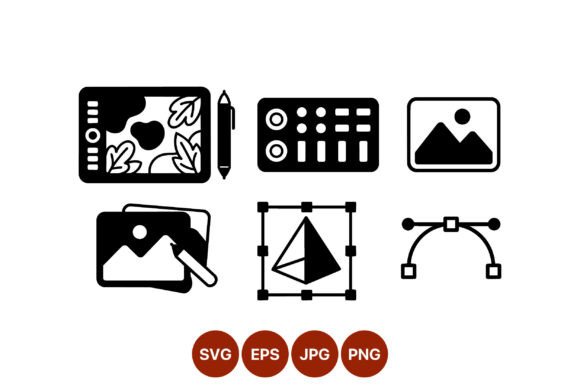
With 100 vector icons included, users can access a wide range of tools such as:
- Drawing tablet with pen
- Color palette
- Image editing tools
- 3D shape selection
- Bezier curve editing handles
Purpose and Practical Use of the Icon Set
Icons serve as visual shorthand in digital interfaces, helping users understand functionality at a glance. The Graphic Design Vector Tool Icon Set is especially useful for:
- UI/UX designers building design software or creative platforms
- Educators creating tutorials or instructional materials
- Businesses developing branding or marketing materials
- Developers integrating design-related features into apps or websites
Because the icons are available in multiple formats, they can be used across both digital and print media without compromising quality. Whether you're designing a mobile app or a presentation slide, these icons offer flexibility and clarity.
Who Benefits Most from This Icon Set?
While the Graphic Design Vector Tool Icon Set is ideal for professional designers, it also benefits:
- Small business owners looking to create cohesive branding materials
- Students learning design tools and software interfaces
- Freelancers building portfolios or client-facing assets
- Web developers integrating design features into platforms
Its black and white aesthetic ensures that the icons remain neutral and adaptable, making them easy to integrate into any color scheme or design style.
Key Features and Design Characteristics
One of the standout features of this icon set is its high-contrast design. This ensures that each icon remains legible and distinct, even at small sizes. Additionally, because the icons are vector-based (especially the SVG and EPS files), they can be scaled infinitely without losing quality. This makes them suitable for:
- Retina displays and high-resolution screens
- Print materials such as brochures, posters, and infographics
- Mobile app icons and responsive website graphics
The simplicity of the black and white style also makes the icons versatile for customization. Designers can easily recolor them using vector editing software or apply filters and effects to match brand guidelines or interface themes.
Real-World Applications of the Icon Set
Here are a few real-world examples of how the Graphic Design Vector Tool Icon Set can be applied:
- Design Software Interface: Use icons to represent tools like the color picker, pen tool, or 3D modeling functions in a custom design application.
- Online Tutorials: Enhance digital courses or blog posts with clear visual representations of design tools and concepts.
- Marketing Materials: Incorporate icons into promotional banners, social media posts, or product packaging to highlight creative capabilities.
- Portfolio Websites: Display your design skills with clean, professional icons that reflect the tools you use.
Evaluating the Icon Set for Your Needs
When considering whether the Graphic Design Vector Tool Icon Set is right for your project, ask yourself the following:
- Do you need a scalable, high-quality set of design-related icons?
- Will you be using the icons across multiple platforms or formats?
- Do you prefer minimalist, black and white visuals that are easy to customize?
- Are you looking for a cost-effective solution with a variety of tools included?
If you answered “yes” to any of these questions, this icon set could be an excellent addition to your design toolkit.
Strengths and Considerations
Like any design asset, the Graphic Design Vector Tool Icon Set has its strengths and potential limitations:
Strengths:
- High-quality vector files for scalability
- Multiformat support (SVG, PNG, JPG, EPS)
- Wide variety of relevant design tools included
- Minimalist, high-contrast design for easy integration
Considerations:
- Black and white style may require recoloring for some branding projects
- May not suit projects requiring highly detailed or colorful icons
- Requires basic knowledge of vector editing tools to customize
Getting Started with the Icon Set
Once you download the ZIP folder containing the Graphic Design Vector Tool Icon Set, you can begin integrating the icons into your workflow immediately. For web use, SVG files are recommended for their crisp display on all screen sizes. For print, EPS files will ensure the highest quality output. PNG and JPG files are great for quick use in presentations, social media, or mobile apps.
Designers can import the icons directly into vector editing software such as Adobe Illustrator, Inkscape, or Figma for further customization. Because the icons are vector-based, they can be resized, recolored, or combined with other elements without any loss of quality.
Final Thoughts
The Graphic Design Vector Tool Icon Set is a valuable resource for anyone working in design, education, or digital development. Its versatility, quality, and broad application make it a smart investment for both personal and professional use. Whether you're building a design app, creating tutorial content, or enhancing your brand visuals, this icon set provides the clarity and functionality you need to succeed.
By incorporating these icons into your projects, you can improve user experience, streamline design workflows, and ensure your visuals remain crisp and professional across all platforms.